 EaSynth Look and Feel Designer
What is EaSynth Look And Feel Designer?
EaSynth Look And Feel Designer is a professional IDE for Java Synth based look and feel.
With its help, you will feel much easier to develop a new look and feel. it can:
- Edit Synth based look and feel visually
- Preview your new look and feel on any Java application.
- Diagnose your new look and feel in runtime.
- Export look and feel as JAR file, which can be easily integrated with your Java application.
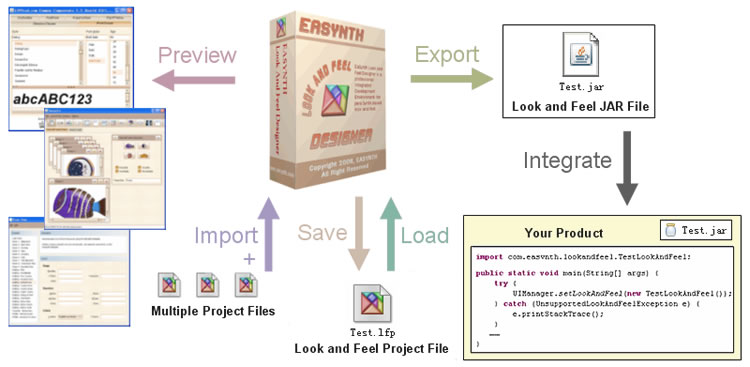
EaSynth Look And Feel Designer works in Windows, Mac OS X, Linux and Unix operation system, JRE/JDK 5 or above is required.
The IDE itself use EaSynth Look And Feel as the default look and feel, which is created by the IDE and open-sourced as a sample of look and feel project.
Document and Tutorial
You can launch the Online Documents of this tool, which is synchronous with the help documents shown in the tool.
The articles below can help you start quickly:
- FAQ of EaSynth Look And Feel Designer
- Why We Need Such A Look And Feel IDE?
- Editing Component Styles with EaSynth Look And Feel Designer
- Two Steps to Integrate New Java Theme into Your Applications
- Three Ways to Preview New Look And Feel
We strongly recommend you to go through this Flash Tutorial Movie: Define Style For Regular Buttons
Download and Trial
You can download the trial version for FREE, the trial version has most features except the output ability. If you need the full featured version, please purchase the license and then activate your software.
Description |
File Size |
||
|---|---|---|---|
EaSynth Look And Feel Designer Build 217
Minimized Package |
If you already have Java Runtime installed, you can download this bundle. Make sure JRE5+ (JRE6 is preferred) is already installed in your system, and then extract the package to run. Note: It works on Windows, Mac OS X, Linux and Solaris, but you may need more technical skills to use it. |
8.1 MB |
|
EaSynth Look And Feel Designer Build 217
Windows Bundle |
It is recommended for most Windows users. The installer contains everything necessary. Just follow the step-by–step instruction in the wizard to install and run. |
23.9 MB |
If you need helps on downloading the software, please feel free to contact our support team: support@easynth.com
Buy License Now
What will you get?
- You will receive the serial number for activating the software, thus you can use the full featured version.
- You will get free support on software usage at any time you need.
- You can upgrade the software online for lifetime.
We accept Payment via PayPal or RegNow
We accept payment via PayPal or Regnow. If you have no PayPal account, don't worry since you can
pay via PayPal with your credit card or bank card, as all major
credit cards and bank cards are supported, and you don't have to register a PayPal account. If you don't like to use PayPal, you can also consider placing order via RegNow.
Pricing and Buy Links
The price for single license is $245 USD, buying multiple licenses can have discount.
Detailed pricing will be available after clicking this button:
If you need helps on purchasing the software or service, please contact our support team: support@easynth.com